How to Fix Missing Person Problems in Travel Group Photos
Every group trip seems to come with the same small frustration. You hike to the viewpoint. Everyone’s there. The light is perfect. Someone raises a phone. A countdown. Click.
Later, back at the hotel or on the flight home, you scroll through the photos – and there it is. One person didn’t make it into the shot. Again.
Usually, the reason is obvious. Someone offered to take the photo. Someone arrived a minute late. Or the moment happened quickly, before everyone was fully together. It’s not dramatic, but it’s disappointing. That photo was supposed to capture all of you.
The good news is that this doesn’t have to stay a problem. Modern photo editing makes it possible to fix these situations in a way that looks natural and believable. With tools like PhotoWorks and techniques explained in guides such as how to add someone to a picture, you can finally bring everyone back into the frame – without the photo looking edited.
This guide walks you through how to do it, step by step, with practical advice along the way.
Why Someone Is Almost Always Missing in Group Travel Photos
Travel photography rarely happens under ideal conditions. You don’t have controlled lighting, a tripod assistant, or endless time. Things move quickly. People move faster.
Some common situations probably sound familiar:
- One person ends up being the photographer every time
- You rely on a self-timer and run out of seconds
- You’re in a remote spot with no one around to help
- The group splits briefly during activities and misses key moments
On group trips – especially with friends or family – the goal isn’t perfection. Its completeness. Everyone wants to look back and say, Yes, we were all there.
When Adding a Person Makes Sense (and When It Doesn’t)
Let’s clear something up. Adding a person to a photo isn’t about rewriting history. It’s about correcting a technical limitation.
There are plenty of situations where it makes complete sense:
- A friend who took the photo but was present the entire time
- Someone who stepped away for a moment and missed one shot
- A family member who joined later but belongs in the shared memory
- A travel companion who missed one activity but was part of the trip
Context matters. If the edit reflects what actually happened – who was there, who shared the experience – then it’s not deception. It’s storytelling.
What You Need Before You Start
Good edits start with good preparation. Before opening any software, gather the right images.
You’ll need:
- The main group photo where someone is missing
- Another photo of the missing person, taken around the same time
- Similar lighting and perspective, if possible
Photos taken just minutes apart usually work best. And no, you don’t need professional equipment. Smartphone photos are more than enough as long as they’re reasonably clear.
How to Add a Person to a Travel Photo: Step by Step
This process sounds more complicated than it actually is. PhotoWorks is designed to keep things simple and realistic, even if you’re not an experienced editor.
Step 1: Open the Photo of the Missing Person
Start PhotoWorks and load the image that includes the person you want to add. Ideally, their posture and camera angle should roughly match the group photo.
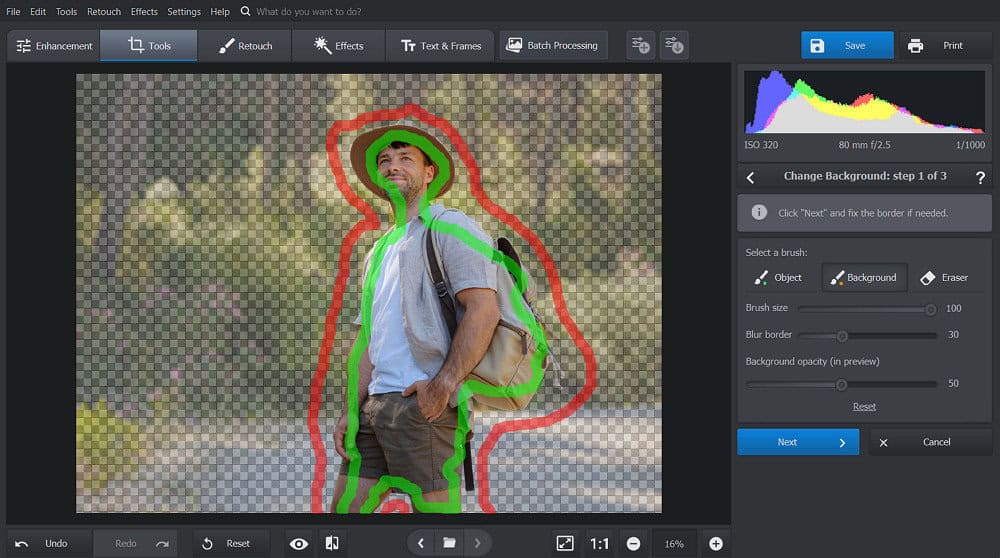
Step 2: Cut Out the Person
Use the Change Background tool to isolate the subject. You can try the automatic AI removal first, or mark the subject and background manually using the green and red brushes. Don’t stress about perfect edges – slightly soft borders blend more naturally.
Step 3: Import the Main Group Photo
Click Next and load the group photo where the person is missing. This image becomes the new background.
Step 4: Place and Adjust
Resize and reposition the person so they match the scale and angle of the rest of the group. Pay attention to head height and where the feet meet the ground. Use the color adjustment slider to match lighting and tones. When done carefully, the result doesn’t draw attention to itself – and that’s the goal.
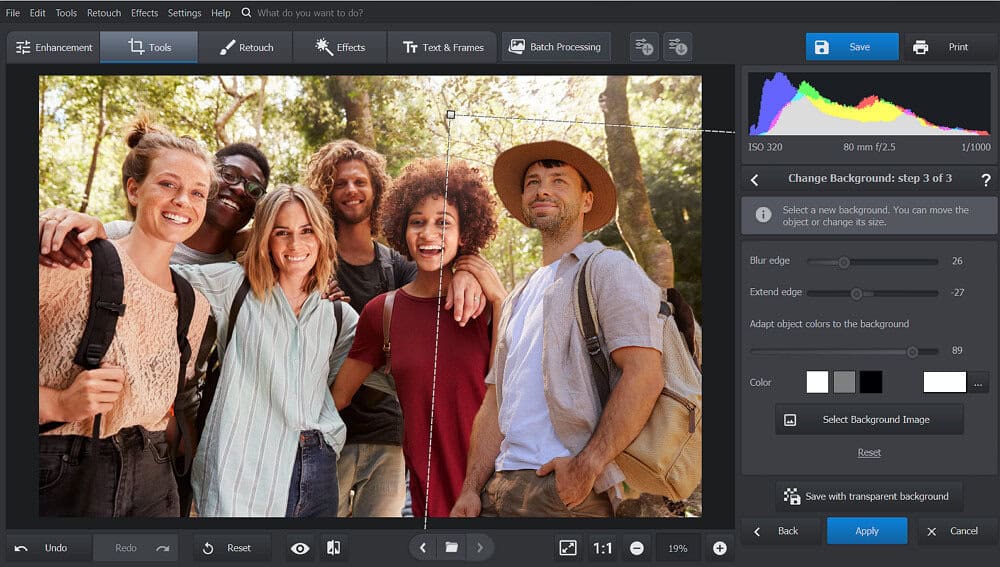
Click Apply, save the image, and you’re ready to share it.
Tips for Making the Edit Look Natural
Small details make a big difference. Keep these guidelines in mind:
- Avoid placing the added person in the brightest or most dramatic light
- Match body angles with the rest of the group
- Don’t over-sharpen or over-smooth the subject
- Add subtle shadows so they feel grounded
- When in doubt, adjust less – not more
If you don’t immediately notice the edit, you’ve done it right.
Other Situations Where This Technique Works
This approach isn’t limited to travel photos. It’s useful anytime real life interferes with timing:
- A friend missed part of a bachelor or bachelorette trip
- Someone left early and missed the final group shot
- You want to combine moments from the same day into one image
- A child refused to pose – but smiled later
As long as the story remains honest, the technique holds up.
Why This Matters for Travel Memories
Photos are more than pixels. They’re evidence of shared time. Years from now, no one will remember who pressed the shutter. They’ll remember who was there.
Fixing a missing person in a travel photo:
- Preserves the completeness of the memory
- Prevents regret when revisiting albums later
- Makes printed books and framed photos feel whole
It’s a small adjustment with long-term emotional value.
Final Thoughts
Group travel photos don’t have to be imperfect by default. A missing person in the frame doesn’t mean they have to be missing from the memory.
With the right tools and a thoughtful approach, you can create images that reflect the reality of your trip – not just the limitations of the moment. Everyone belonged there. Now, the photo can show it.
Read also: 142 Inspirational, Funny, and Cute Vacation Instagram Captions